The short answer: eZUS is your online account with ZUS
eZUS, also called PUE ZUS (Platforma Usług Elektronicznych), is the online portal of ZUS, Poland's Social Insurance Institution. ZUS describes it as internet access to its services: you can view the data ZUS holds about you, send insurance documents, file applications and receive answers, ask questions and book a visit at a ZUS office.
ZUS states that you can use eZUS if you are at least 13 years old, create an account and confirm your identity. For an employee it is mainly a window into their own records. For anyone who pays contributions, such as a business owner, having an eZUS account has been a legal obligation since 1 January 2023.

How to register: choose how you will confirm your identity
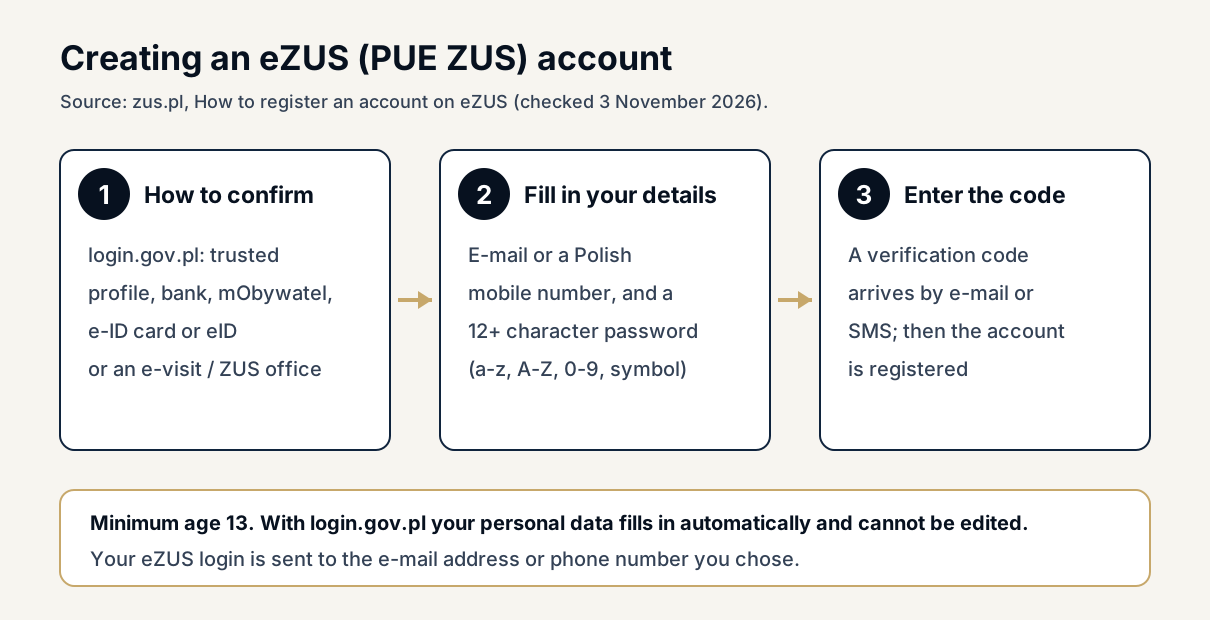
Registration starts on zus.pl with the button for registering in eZUS. ZUS then asks how you want to confirm the account. One route is login.gov.pl, where you confirm online with a trusted profile (profil zaufany), electronic banking, the mObywatel app, an e-ID card (e-Dowód) or eID. The other route is an e-visit, a video call with a ZUS employee, or a visit to a ZUS office.
If you register through login.gov.pl, ZUS fills in your personal data automatically and you cannot edit it in the form. That is convenient, but it means your details must already be correct in the national systems. Foreign residents without Polish e-ID tools can use the e-visit or office route instead; our guide to Profil Zaufany for foreigners explains how a trusted profile can be set up.
Step by step: details, password and verification code
In the first step you enter your personal data and answer whether you are a contribution payer. ZUS asks you to answer yes if, for example, you run your own business, insure yourself voluntarily, employ a nanny, are a company partner obliged to be insured or are a member of the clergy, and in that case to enter your NIP. You then choose your access data: an e-mail address or a mobile number registered in Poland, which may belong to only one eZUS account.
Next you set a password of at least 12 characters with lower- and upper-case letters, special characters and digits, and it must not be built from your name, surname, date of birth or PESEL. After accepting the terms, you enter the verification code sent to your e-mail or phone. ZUS confirms the registration and sends your eZUS login to the contact you chose.
What an employee can check in eZUS
For an insured person such as an employee, ZUS says eZUS shows the data recorded on your ZUS account, the annual information on the state of your insurance account and information about sick notes issued to you. It is a practical way to check whether your employer has reported you for insurance and whether contributions are recorded in your name.
The annual statement is called IOSKU (informacja o stanie konta ubezpieczonego). ZUS prepares it every year for each person born after 1948 who has ever been insured and has at least one contribution recorded, and since 2020 it sends paper letters only on request. To open it, go to the insured person's panel, choose the account information tab, select the year and open the PDF preview, which you can download or print.
What a business owner or employer can do in eZUS
For contribution payers, ZUS lists balance information showing paid contributions, contributions due and payments made, the annual payer information, declarations already sent, the list of people reported for insurance and the list of employees on sick leave. Payers can also file dozens of application forms, including a request for a certificate of no contribution arrears, an account settlement, a check of an employee's sick note and a power of attorney.
eZUS also lets a payer create an electronic confirmation of their ZUS data, such as the balance for the last 12 months, sealed with a qualified ZUS seal and saved as PDF or XML for a bank or other institution. Employers can see employees' electronic sick notes (e-ZLA), order e-ZLA reports, receive SMS or e-mail alerts and report contracts for a specific task (umowa o dzieło) on form RUD, for up to 50 contractors at a time.
| Who | Examples of what you can do | Note |
|---|---|---|
| Insured person (employee) | Check your ZUS account data, annual IOSKU statement, sick notes issued to you | Paper IOSKU letters only on request since 2020 |
| Contribution payer | Balances, contributions due, declarations sent, insured persons, employees on sick leave | eZUS account mandatory since 1 January 2023 |
| Payer applications | No-arrears certificate, account settlement, sick-note check, power of attorney | Some filings need a trusted profile or qualified signature |
| Payer tools | Sealed data confirmations, e-ZLA reports and alerts, RUD reports, free ePłatnik app | ePłatnik is meant for payers with up to 100 insured persons |
Signatures, the ePłatnik app and the ZUS hotline
Viewing data is only part of eZUS. ZUS warns that to send some applications, letters and insurance documents you need a trusted profile or an electronic signature confirmed by a qualified certificate. If you plan to file documents yourself rather than only read them, set up one of these tools before you need it, because they take time to arrange.
Small and medium payers with up to 100 insured persons can use ePłatnik, a free application inside eZUS that guides them through insurance documents, fills in data from ZUS systems and blocks sending documents with errors. ZUS also runs a contact centre on 22 560 16 00. Without an account it gives general information; with an eZUS login and a PIN activated in the account settings, consultants can discuss your own data.
Common problems and how to avoid them
The most frequent obstacle for foreigners is the access data: ZUS accepts an e-mail address or a mobile number registered in Poland, and each can belong to only one account. If you share an e-mail address with a family member or an accountant, choose your own address instead. Also keep your password away from helpers; anyone who logs in as you can see your insurance data.
A second problem is assuming that registration alone is enough. You still need to confirm your identity through login.gov.pl, an e-visit or a visit at a ZUS office before using the account. If your details in eZUS look wrong, for example a missing employer or a gap in contributions, raise it with your employer first, then with ZUS through eZUS or the contact centre.
Next steps
Register through the login.gov.pl route if you have a trusted profile or Polish banking, or book an e-visit if you do not. Once you are in, check that your employer appears in your insurance data and open your latest IOSKU statement. If you run a business, confirm that your payer profile is active, because the account is a legal requirement for payers.
If you employ staff or run a company in Poland and want help organising ZUS registrations, payroll documents and eZUS routines, see our 1 Point Business Service Package or contact us. For the employer side of registration forms, read our guide to ZUS registration for employers.
Frequently asked questions
What is eZUS?
eZUS, also called PUE ZUS, is the online portal of the Polish Social Insurance Institution. It lets you view the data ZUS holds about you, send documents, file applications, ask questions and book a visit at a ZUS office.
Who can create an eZUS account?
ZUS states that anyone aged at least 13 can create an account, provided they confirm their identity through login.gov.pl, an e-visit with a ZUS employee or a visit at a ZUS office.
ZUS: how to register on eZUS →Can I register with a foreign phone number?
ZUS asks for an e-mail address or a mobile number registered in Poland as your access data. If you have no Polish number, use your own e-mail address, which must not be used by another eZUS account.
Is an eZUS account mandatory?
For contribution payers, yes. ZUS states that since 1 January 2023 everyone who pays contributions, such as a business owner, must have an eZUS account. For employees it is optional but useful for checking their records.
Where do I find my annual ZUS account statement?
In the insured person's panel, open the account information tab, select the year, open the details and then the preview. The statement opens as a PDF you can download or print.
Community content reflects individual experiences and should not be treated as legal, immigration, financial or government advice.
Know someone who may find this guide useful?